We’ve all been there. You’re ready to modernize your observability pipeline. You’ve got the green light to move from legacy syslog servers (like syslog-ng) to Cribl Stream. It sounds like a straightforward lift-and-shift, right? But then you flip the switch, and suddenly your downstream SIEM is screaming about unparsed events, your timestamps are drifting, and your load balancers are pinning traffic to a single node.
https://discoveredintelligence.com/wp-content/uploads/2025/12/zero-change-migration.png12001200Terry Mulliganhttps://discoveredintelligence.com/wp-content/uploads/2013/12/DI-Logo1-300x137.pngTerry Mulligan2025-12-30 15:41:382026-01-13 16:26:50Migrating Syslog to Cribl Stream: The Art of the “Zero Change” Migration
If you’re running Cribl Stream in a distributed environment, you already know the Leader Node is critical, and a Git is non-negotiable for handling config bundling and version control. You’ve probably already discovered how painful it is to experience inconsistencies between development and production, and ultimately, these can lead to unexpected outages, security vulnerabilities, or compliance violations. To avoid this, we like to implement a full GitOps workflow. This way, you apply disciplined CI/CD methods to your configurations, enforcing change control through standard Pull Requests, ensuring everything is auditable, and keeping production rock-solid.
The Foundation: Git Integration in Cribl Stream
For us to implement any truly sophisticated change management within a distributed Cribl environment, Git integration is the absolute essential building block. Since Cribl’s architecture involves a Leader Node coordinating multiple Worker Groups, having centralized version control isn’t just a best practice – it’s mandatory. The Leader Node simply won’t start without it installed in a distributed deployment.
Why Git is Non-Negotiable for Cribl Leaders
Git provides several immediate, built-in benefits essential for managing your dynamic data pipelines:
Audit Trails: Every configuration change is recorded in Git, creating a history of who changed what and when, satisfying crucial security and compliance needs.
Version Comparison and Reversion: It’s an easy way to compare different configuration versions, simplifying the process of identifying and isolating problematic changes, and enabling rapid rollback when necessary.
Configuration Bundling: On a fundamental level, the Cribl Leader uses Git to bundle the finalized configurations, which are then distributed to the Workers in the field.
Beyond Local Commits: Leveraging Remote Git
While a basic deployment just relies on local commits for managing configurations, we find that a true enterprise-grade strategy needs to utilize Remote Git integration, using tools like GitHub or Bitbucket. This remote capability is a robust backup and disaster recovery solution. The key advantage here is redundancy, since the Leader Node holds the main copy of all configurations; its failure could be catastrophic. By simply setting up the Cribl Leader to push its configurations on a schedule to that remote repository, we ensure an off-instance backup. That way, if a primary Leader Node ever goes down, we can always spin up and restore a new Leader directly from the last known-good configuration copy in Remote Git, drastically reducing our recovery time.
Implementing Full GitOps: CI/CD for Data Pipelines
GitOps elevates Git beyond a backup tool; we use it as the single source of truth for my entire data pipeline ecosystem. We believe this model is ideal for organizations that need stringent control, especially those handling complex regulatory requirements or massive volumes of mission-critical data. The core concept is pretty straightforward: it means rigorously separating the development and production environments and strictly governing the flow of all changes between them using standard Git branches and pull requests.
The Two-Environment GitOps Model
In this approach, you maintain two separate Cribl environments, each tied to a dedicated Git branch on the remote repository:
Development Environment: Connected to the dev branch. All initial configuration work – such as building new data Sources, Destinations, or Pipelines – is done here.
Production Environment: Connected to the prod branch. Crucially, the Production Leader is set to a read-only mode. This hard constraint prevents manual, unauthorized changes directly in production, forcing all changes to follow the GitOps pipeline.
The Standard GitOps Workflow
The flow for deploying a new configuration involves a structured, multi-step process:
Development and Commit: You will need to create or modify a configuration (e.g., a new Pipeline) in the Dev Leader. Then use the UI to deploy the changes to the worker and to the remote Git repository’s dev branch.
Pull Request and Review: Create a Pull Request (PR) to merge the changes from the dev branch into the prod branch. This triggers a review by the Cribl Administrator or a designated approver.
Merge and Automation: Once reviewed and approved, the PR is merged, updating the prod branch with the verified configuration. This merge action does not automatically deploy the configuration to the Production Leader.
External Sync Trigger: To apply the changes, an external CI/CD tool (such as Jenkins, GitHub Actions, or a homegrown script) must trigger the Production Leader. You can do this by hitting the Leader’s REST API endpoint /api/v1/version/sync
Deployment to Workers: Once the Production Leader has the new configuration, it automatically distributes the update to its connected Workers.
Handling Environment-Specific Configurations
A key challenge in this two-environment model is that, by default, all development configurations are pushed to production. This isn’t always desirable, and sometimes you need granular control. This is where using environment tags comes into play to manage state:
C.LogStreamEnv Variable: Cribl automatically manages a C. LogStreamEnv variable that identifies whether an instance is DEV or PRD (Production).
Selective Configuration: The environment tag can be used in JavaScript expressions for Sources and Destinations. For example, a Destination defined for production will be enabled in the Prod environment but will appear disabled (“greyed out”) in the Dev environment, offering necessary flexibility while maintaining the core GitOps flow.
Use Case : Updating Lookup Files in GitOps
With enabling GitOps, one interesting use case we have come across is updating a lookup in Cribl via Git. While Cribl provides REST API endpoints for programmatically updating lookups, this customer was interested in using their existing CI/CD process for providing a self-service capability to their users for updating the lookup file. The following steps detail how the update flow looks:
User Update: The user (or an automated script) updates the Lookup File directly within the remote Git repository’s dev branch.
Pull Request and Review: Create a Pull Request (PR) to merge the changes from the dev branch into the prod branch. This triggers a review by the Cribl Administrator or a designated approver.
Merge and Automation: Once reviewed and approved, the PR is merged, updating the prod branch with the verified configuration. This merge action does not automatically deploy the configuration to the Production Leader.
External Sync Trigger: To apply the changes, an external CI/CD tool (such as Jenkins, GitHub Actions, or a homegrown script) must trigger the Production Leader. You can do this by hitting the Leader’s REST API endpoint /api/v1/version/sync
Update DEV leader: Since the lookup update happened directly on the dev branch, the DEV leaders is not aware of the change and we need to do a git pull on the dev leader to keep it up to date with the branch. This again can be part of the external trigger automation
Final Thoughts
Transitioning to a GitOps workflow for Cribl Stream elevates how we manage our data pipelines, moving us away from manual, error-prone changes toward a scalable, auditable, and secure CI/CD process. By embracing Git as the control plane for configuration, we gain the confidence that every single deployment is consistent, every change is traceable, and the production environment is protected by a strong, automated defense against unauthorized modifications. This is more than just an operational improvement; it’s a critical step in building a truly resilient and compliant data observability platform.
Discovered Intelligence Inc., 2025. Unauthorized use and/or duplication of this material without express and written permission from this site’s owner is strictly prohibited. Excerpts and links may be used, provided that full and clear credit is given to Discovered Intelligence, with appropriate and specific direction (i.e. a linked URL) to this original content.
https://discoveredintelligence.com/wp-content/uploads/2025/11/gitops-workflow.png12001200Anoop Ramachandranhttps://discoveredintelligence.com/wp-content/uploads/2013/12/DI-Logo1-300x137.pngAnoop Ramachandran2025-12-02 15:47:302025-12-02 15:48:28Cribl and GitOps: From Development to Production
One recurring challenge in managing cloud environments is the tendency for lab and development instances to remain active long after they’re needed. While it might seem like a small oversight, the impact can be significant. These idle instances rack up unnecessary costs, drain valuable resources, and open the door to security vulnerabilities. Configuring effective monitoring to notify about the running instances is a good way to address this problem.
https://discoveredintelligence.com/wp-content/uploads/2025/01/cribl-search-to-monitor-gcp.jpeg6671000Anoop Ramachandranhttps://discoveredintelligence.com/wp-content/uploads/2013/12/DI-Logo1-300x137.pngAnoop Ramachandran2025-01-14 15:09:322025-01-15 13:45:56Using Cribl Search to Monitor Instances in Google Cloud Platform (GCP)
If your Cribl environment was set up a few years ago, it might be time to revisit some of your settings—particularly the Persistent Queue (PQ) settings on your source inputs. Recently, while troubleshooting an issue, I discovered that the PQ settings were the root cause of the problem. I wanted to share my findings in case they help you optimize your Cribl setup.
https://discoveredintelligence.com/wp-content/uploads/2024/11/persistent_queues.jpg6651000Terry Mulliganhttps://discoveredintelligence.com/wp-content/uploads/2013/12/DI-Logo1-300x137.pngTerry Mulligan2024-12-10 17:08:082024-12-11 18:32:18Beyond Smart: When ‘Always On’ Mode is the Best Choice for Cribl Persisent Queues
If you are like me when I started with Cribl, you will have plenty of Splunk knowledge but little to no Cribl experience. I had yet to take the training, had no JavaScript experience, and only had a basic understanding of Cribl, but I didn’t let that stop me and just dove in. Then I immediately struggled because of my lack of knowledge and spent countless hours Googling and asking questions. This post will list the information I wish I had possessed then, and hopefully make your first Cribl experience easier than mine.
Cribl Quick Reference Guide
If I could only have one item on my wish list, it would be to be aware of the Cribl Quick Reference Guide. This guide details basic stream concepts, performance tips, and built-in and commonly used functions.
Creating that first ingestion, I experienced many “how do I do this” moments and searched for hours for the answers, such as “How do I create a filter expression?” Generally, filters are JavaScript expressions essential to event breakers, routes, and pipelines. I was lost unless the filter was as simple as 'field' == 'value.' I didn’t know how to configure a filter to evaluate “starts with,” “ends with,” or “contains.” This knowledge was available in the Cribl Quick Reference Guide in the “Useful JS methods” section, which documents the most popular string, number and text Javascript methods.
Common Javascript Operators
Operator
Description
&&
Logical and
||
Logical or
!
Logical not
==
Equal – both values are equal – can be different types.
===
Strict equal – both values are equal and of the same type.
!=
Returns true if the operands are not equal.
Strict not equal (!==)
Returns true if the operands are of the same type but not equal or are of different kinds.
Greater than (>)
Returns true if the left operand is greater than the right operand.
Greater than or equal (>=)
Returns true if the left operand is greater than or equal to the right operand.
Less than (<)
Returns true if the left operand is less than the right operand.
Less than or equal (<=)
Returns true if the left operand is less than or equal to the right operand.
Regex
Cribl uses a different flavour of Regex. Cribl uses ECMAScript, while Splunk uses PCRE2. These are similar, but there are differences. Before I understood this, I spent many hours frustrated that my Regex code would work in Regex101 but fail in my pipeline.
Strptime
It’s almost identical to the version that Splunk uses, but there are a few differences. Most of my problems were when dealing with milliseconds. Cribl uses %L, while Splunk uses %3Q or %3N. Consult D3JS.org for more details on the strptime formatters.
JSON.parse(_raw)
When the parser function in a pipeline does not parse your JSON event, it may be because the JSON event is a string and not an object. Use an eval function with the Name as _raw and the Value Expression set to JSON.parse(_raw), which will convert the JSON to an object. A side benefit of JSON.parse(_raw) is that it will shrink the event’s size, so I generally include it in all my JSON pipelines.
Internal Fields
All Cribl source events include internal fields, which start with a double underscore and contain information Cribl maintains about the event. Cribl does not include internal fields when routing an event to a destination. For this reason, internal fields are ideal for temporary fields since you do not have to exclude them from the serialization of _raw. To show internal fields, click the … (Advanced Settings) menu in the Capture window and toggle Show Internal Fields to “On” to see all fields.
Event Breaker Filters for REST Collector or Amazon S3
Frequently, expressions such as “sourcetype=='aws:cloudwatchlogs:vpcflow‘” are used in an Event breaker filter, but sourcetype cannot be used in an Event Breaker for a REST Collector or an Amazon S3 Source. This is because this sourcetype field is set using the input’s Fields/Metadata section, and the Event Breaker is processed before the Field/Metadata section.
For a REST collector, use “__collectible.collectorId=='<rest collector id>'” internal field in your field expression, which the REST collector creates on execution.
One of Cribl Stream’s most valuable functions is the ability to effortlessly drop fields that contain null values. Within the parser function, you can populate the “Fields Filter Expression” with expressions like value !== null.
Some example expressions are:
Expression
Meaning
value !== null
Drop any null field
value !== null || value==’N/A’
Drop any field that is null or contains ‘N/A’
Once I obtained these knowledge nuggets, my Cribl Stream was more efficient. Hopefully, my pain will be your gain when you start your Cribl Stream journey.
https://discoveredintelligence.com/wp-content/uploads/2024/06/things_i_wish_i_knew_cribl.png532800Terry Mulliganhttps://discoveredintelligence.com/wp-content/uploads/2013/12/DI-Logo1-300x137.pngTerry Mulligan2024-07-08 13:00:002024-07-08 17:05:59Cribl Stream: Things I wish I knew before diving in
April marked the beginning of a new era for Cribl with the introduction of Cribl Lake, which brings Cribl’s suite of products full circle in the realm of data management. In this post we dive a bit deeper into some of the benefits and features of Cribl Lake.
https://discoveredintelligence.com/wp-content/uploads/2024/05/cribl-lake-1.png354553Discovered Intelligencehttps://discoveredintelligence.com/wp-content/uploads/2013/12/DI-Logo1-300x137.pngDiscovered Intelligence2024-06-06 16:21:352024-06-06 16:30:10Introducing the benefits and features of Cribl Lake
Cribl Stream provides a flexible way of storing full-fidelity raw data into low-cost storage solutions like AWS S3 while sending a reduced/filtered/summarized version into Analytical Platforms for cost-effectiveness. In this blog post, I’ll walk you through setting up Cribl workers on AWS ECS and implementing dynamic auto scaling for seamless scale-out and scale-in as the demand fluctuates.
https://discoveredintelligence.com/wp-content/uploads/2024/05/cribl-worker-ecs.jpg567999Anoop Ramachandranhttps://discoveredintelligence.com/wp-content/uploads/2013/12/DI-Logo1-300x137.pngAnoop Ramachandran2024-05-29 12:42:482024-05-29 14:40:05Deploying Cribl Workers in AWS ECS for Data Replay
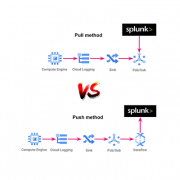
In this blog we will talk about the processes and the options we have to collect the GCP events and we will see how to collect those in Splunk. In addition, we will even add integration with Cribl, as an optional step, in order to facilitate and optimize the process of information ingestion. After synthesizing all of this great information, you will have a great understanding of the available options to take, depending on the conditions of the project or team in which you work.
https://discoveredintelligence.com/wp-content/uploads/2023/08/gcp_splunk_spotlight.png400600Discovered Intelligencehttps://discoveredintelligence.com/wp-content/uploads/2013/12/DI-Logo1-300x137.pngDiscovered Intelligence2023-08-09 16:34:142023-08-29 01:04:31Building a Unified View: Integrating Google Cloud Platform Events with Splunk
Once you have embraced and grasped the power of Cribl Stream, “Reduce! Simplify!” will become your new mantra.
Here we list some of the best Cribl Stream resources available to get you started. Most of these resources are completely free! – money is not an obstacle when beginning your Cribl Stream journey, so keep reading and start learning today!
https://discoveredintelligence.com/wp-content/uploads/2023/02/getting_started_with_cribl.png582550Terry Mulliganhttps://discoveredintelligence.com/wp-content/uploads/2013/12/DI-Logo1-300x137.pngTerry Mulligan2023-02-23 15:20:382024-01-19 02:44:06Help Getting Started with Cribl Stream